
Computer vision: what can a model extract from an image?
Machine vision systems can classify an image, detect objects, segment regions, read text and match visual patterns. Google’s actual pipeline is not publicly described as one simple sequence of steps.
What is the difference between the main tasks?
Machine vision systems can classify an image, detect objects, segment regions, read text and match visual patterns. Google's actual pipeline is not publicly described as one simple sequence of steps.
| Task | Result | SEO example |
|---|---|---|
| Classification | A category for the whole image | Shoe, car, cake |
| Detection | An object and a bounding box | Several products in one frame |
| Segmentation | Regions or pixels of an object | Separating a product from its background |
| OCR | Text read from the image | A label or a model name |
| Embedding / matching | Visual similarity | Similar products or scenes |
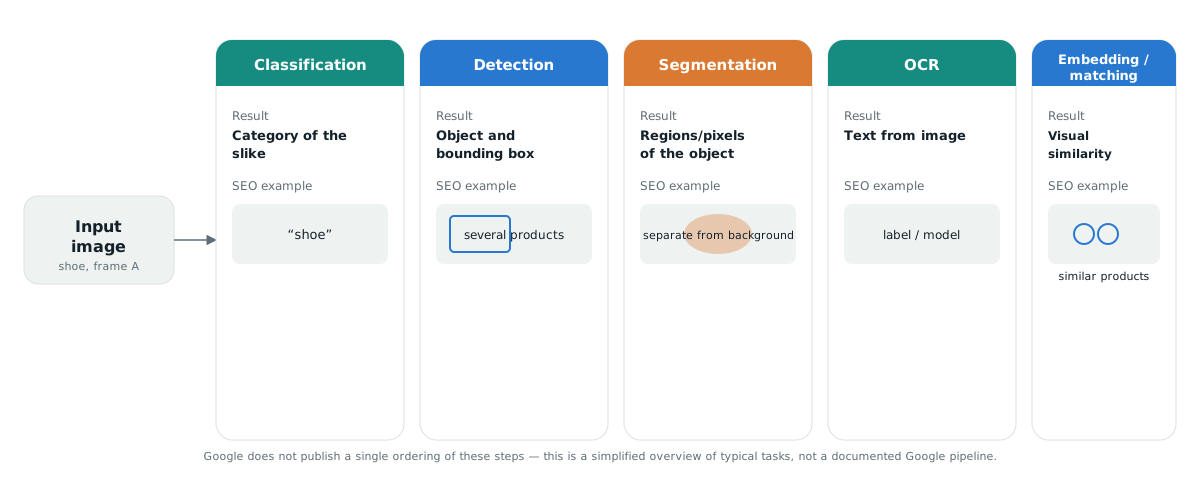
Which task corresponds to which decision on your site?
The breakdown into tasks is not academic. Each one maps to a different decision when preparing images, and a wrong assumption leads to the wrong optimisation.
| Task | What follows for your images |
|---|---|
| Classification | The subject must be recognisable from a single frame. An artistic crop that cuts the product makes categorisation harder. |
| Detection | If several products share a frame, none is clearly primary. For product photography, shoot one frame per product. |
| Segmentation | Contrast against the background aids separation. This is why a studio background works better than a cluttered table. |
| OCR | Text in an image may be read, but do not rely on it — the same text must exist as real text. |
| Matching | Consistent framing across a catalogue helps comparison more than one individually perfect photograph. |
What can you reliably do?
The architecture of the system is not public, but a set of practices exists that does not depend on knowing it.
- One subject, one frame for images that need to be recognised as a product.
- Sufficient resolution with sensible compression. Detail that is not in the pixels cannot be extracted; a file that stalls loading causes damage elsewhere.
- Context on the page around the image. The section heading, the surrounding text and the caption carry meaning the image itself need not contain.
- Consistent terminology across alt text, caption and body text — not mechanical repetition of one sentence, but the same term for the same thing.
- Stable image URLs. Changing a path discards whatever the system has already learned about that image.
- Structured data where applicable, with a full
ImageObjectnode rather than a bare URL.
Common wrong assumptions
| Assumption | What actually holds |
|---|---|
| The model “reads” alt text in order to understand the image | Alt is one signal alongside the image content and page context, not an instruction to the model |
| A bigger image always produces a better result | Beyond a point, extra pixels carry no new detail while the cost to speed is real |
| A watermark does no harm | Placed across the subject it can hinder segmentation and recognition |
| A descriptive file name is enough | Google describes it as a very light signal; page context carries more |
What sits inside the file itself
An image carries data that is not pixels: EXIF, IPTC and XMP. Google states that it reads IPTC fields for copyright and licensing, and those fields are shown to the user in Google Images.
| Standard | Typical content | SEO relevance |
|---|---|---|
| EXIF | Device, exposure, date, sometimes GPS | Low; always strip GPS coordinates before publishing |
| IPTC | Creator, rights holder, description, usage terms | Google reads these and shows them in the image panel |
| XMP | Extended descriptions, edit history | Useful for internal asset management |
Two practical consequences. First, GPS coordinates in photographs taken on a phone reveal a location and should be removed — unless the location is deliberately part of the information. Second, compression tools often strip all metadata together, including the licensing fields you meant to keep. Check what yours does.
Relation to structured data: IPTC fields and an ImageObject in JSON-LD do not replace one another. Data in the file travels with the image when someone downloads it; structured data describes the image in the context of the page. For licensing eligibility Google accepts structured data or IPTC, but having both is the consistent choice.
Video and moving content
For video, a system analyses more than the frames — it uses the transcript, the chapters and the structured data. Most of what a search engine understands about a video comes from the text accompanying it, not from the imagery.
| Element | Why |
|---|---|
| A transcript on the page | The only part of the content that is fully readable and searchable |
| Captions as a separate file | Accessibility and comprehension, independent of the transcript |
VideoObject markup | thumbnailUrl, uploadDate, duration, contentUrl |
| Chapters with timestamps | Eligibility for key moments in results |
| A purpose-made thumbnail | The first frame is rarely the most informative frame |
The same principle applies to animated content and to diagrams generated by script: if the information exists only in motion, or only after a script has run, then for part of the system it does not exist.
How do you measure whether images work at all?
Search Console has a separate search type for images. Without splitting that report out from web search, you do not know whether images bring anything.
- Split the search type. In the performance report, switch from “Web” to “Image” and compare impressions and clicks.
- Look at which pages receive those clicks. They are often not the ones you worked hardest on.
- Check image indexing through an image sitemap and the coverage reports.
- Measure by group, not by individual image. One image rarely produces a signal you can conclude anything from.
- Record the date of every significant change to image handling, or you will not be able to attribute anything later.
The limit of measurement: Search Console does not report separately on Google Lens, nor on how often an image was used in a generated answer. Impressions in AI search features exist as a separate report but are not broken down by image. Conclusions about visual search therefore remain indirect.
Checking how images actually perform on a specific site is part of a site audit.
Technical preparation that affects processing
| Decision | Recommendation | Reason |
|---|---|---|
| Format | WebP or AVIF, with JPEG only where necessary | Smaller file at equal quality |
| Dimensions | Several sizes through srcset | A phone should not download a desktop-sized image |
width and height | Always set | They prevent layout shift during loading |
loading | lazy for everything except the first visible image | Deferring the main image worsens loading |
| File name | Descriptive, without diacritics or spaces | A light signal, but a free one |
| Path | Stable, without a hash that changes on every build | A changed path discards the image's history |
The last row is the one most often overlooked on sites using a bundler. If the file name changes on every deploy, every image is a new image with no history as far as a search engine is concerned.
The limit of what can be claimed
This page describes types of task and the practices that follow from them. It does not describe how Google internally combines those tasks, because that is not public.
| Claim | Status |
|---|---|
| Google combines alt text, page content and computer vision algorithms | Confirmed in documentation |
| Google reads IPTC fields for rights and licensing | Confirmed in documentation |
| A file name is a very light signal | Stated by Google |
| A studio background aids separation of the subject | Inferred from the nature of the segmentation task, not a Google claim |
| Consistent framing across a catalogue aids matching | Our working assumption, not measured |
For a controlled example, see the practical guide to visual search.
Frequently asked questions
Does Google use one and the same pipeline for every image?
Google confirms that it combines alt text, page content and machine vision algorithms, but it does not publish the full architecture or a single fixed sequence of steps.
Does a studio background always give a better result?
For product photography, contrast against the background makes separating the subject easier. For content where the context is part of the information, a natural frame may be more appropriate.
Does a watermark cause harm?
Placed across the subject it can hinder segmentation and recognition. A discreet mark away from the subject is a smaller problem.
How do I know whether my images bring any traffic?
Switch the search type in the Search Console performance report from Web to Image. Without that split, image performance is hidden inside the web totals.