
Schema markup: connect real entities, do not invent signal.
JSON-LD gives explicit information about the content of a page and can make certain rich results possible. It does not guarantee ranking, and markup that does not match the visible content may simply be ignored.
Does there have to be only one script block?
Schema.org allows several blocks and Google can process the supported formats. A single cohesive @graph is our maintenance rule, not a Google requirement: it is easier to track stable @id references and to prevent duplicates.
The three rules that matter more than the number of blocks: markup describes the content of the page it sits on; you never add a price, rating, author, image or identity that is not real and verifiable; and you validate syntax with the Schema Markup Validator and eligibility with the Rich Results Test.
This is why the graph is laid out during a site build, while the identifiers are still free, rather than retrofitted onto a finished structure.
Which nodes do we connect?
| Node | When it is justified | Typical relation |
|---|---|---|
Organization | A real organisation is visible on the site | publisher, provider |
Person / ProfilePage | The author is identified and has a visible biography | author, mainEntity |
WebPage / Article | The page and the article have distinct roles | mainEntityOfPage |
Service | The service is genuinely described and available | provider, areaServed |
BreadcrumbList | A clear URL hierarchy exists | WebPage.breadcrumb |
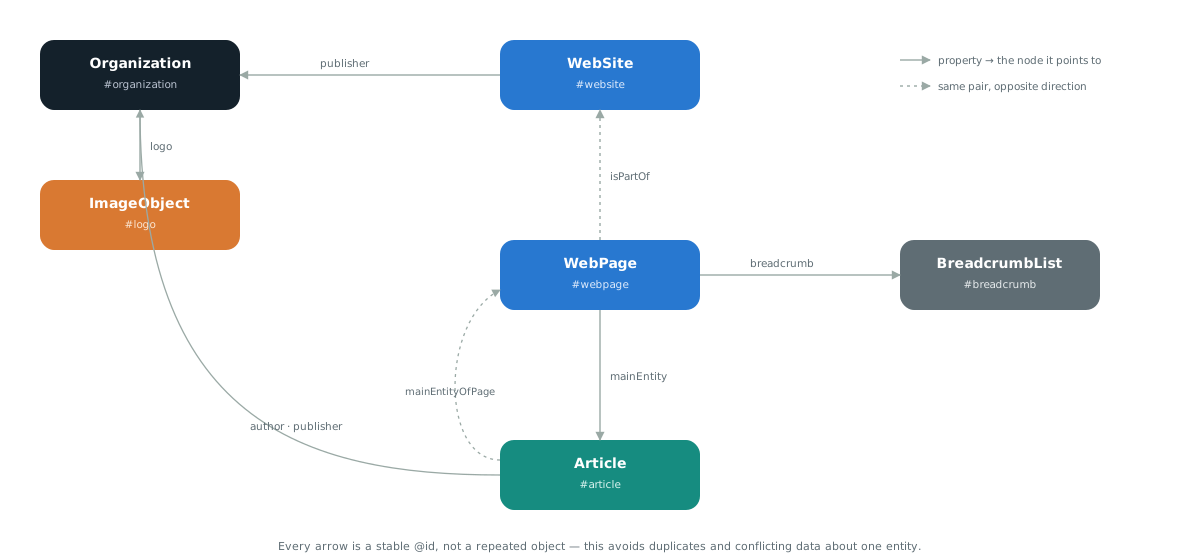
@id, not a repeated object.What does a cohesive graph look like in practice?
Instead of every block repeating the same organisation data, one @graph defines each entity exactly once and routes all further references through a stable @id.
The difference is easiest to see in an example. This is a common pattern that creates duplicates:
{
  "@context": "https://schema.org",
  "@type": "Article",
  "publisher": {
    "@type": "Organization",
    "name": "Example Ltd",
    "logo": "https://example.com/logo.png"
  }
}
If that object is repeated on every page, each copy is a separate, unconnected description. When one detail changes you have to change it everywhere, and you will miss one. The cohesive version looks like this:
{
  "@context": "https://schema.org",
  "@graph": [
    {
      "@type": "Organization",
      "@id": "https://example.com/#organization",
      "name": "Example Ltd",
      "url": "https://example.com/",
      "logo": { "@id": "https://example.com/#logo" }
    },
    {
      "@type": "ImageObject",
      "@id": "https://example.com/#logo",
      "contentUrl": "https://example.com/logo.png",
      "width": 512,
      "height": 512
    },
    {
      "@type": "Article",
      "@id": "https://example.com/article/#article",
      "headline": "Article title",
      "publisher": { "@id": "https://example.com/#organization" },
      "mainEntityOfPage": { "@id": "https://example.com/article/#webpage" }
    }
  ]
}
The organisation is described once. The logo is a full ImageObject with dimensions rather than a bare URL. The article is tied to its page and to its publisher by reference, not by copy.
Domain entities, not just site nodes
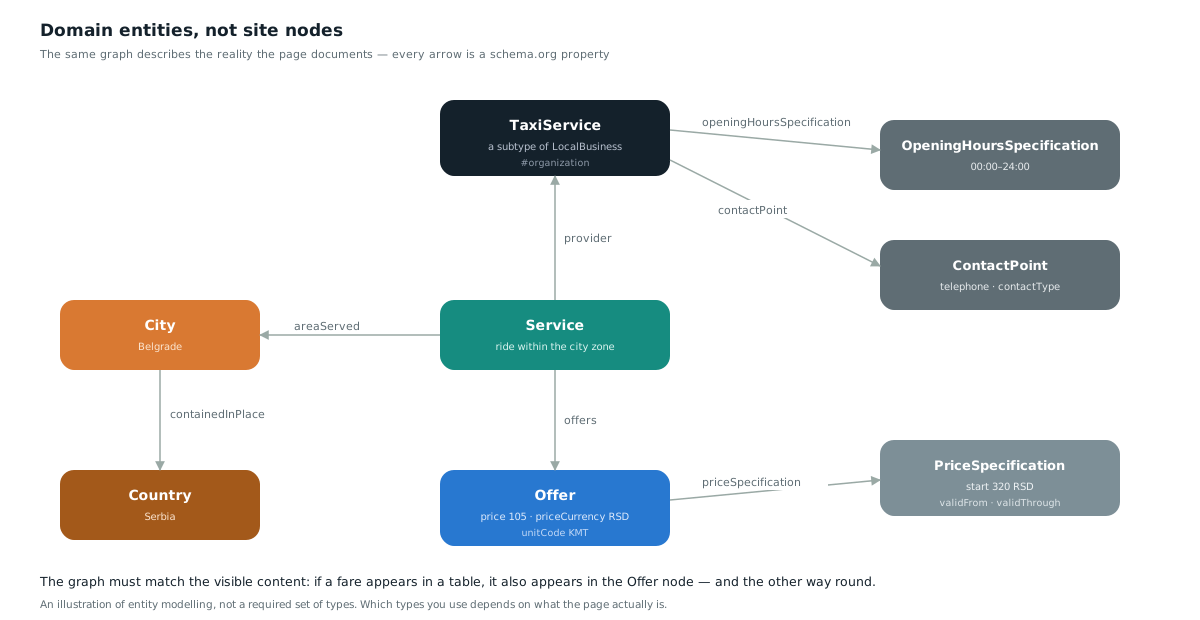
The graph above describes how the site is assembled. There is a second graph, more important for meaning: the entities of the domain itself and the relations between them. The first describes the document; the second describes the reality the document asserts.
The difference is easy to see. WebPage and BreadcrumbList exist because a site exists. Service, Offer and City exist regardless of the site — they would exist even if the page had never been written.
| Graph | What it describes | Typical types |
|---|---|---|
| Document | How the site is assembled and who publishes it | WebPage, Article, BreadcrumbList, WebSite |
| Domain | What exists in reality and how it relates | Service, Offer, Place, Product, Event |
Both graphs belong to the same @graph block and join through mainEntity: the page has a main entity, and that entity comes from the domain graph. Sites carrying only the first graph are technically valid but assert nothing about the world.
A practical test before writing any markup: list the entities the page makes a claim about, and name the relation between each pair. If a relation has no schema.org property, you are probably trying to describe something the page does not actually contain.
How are identifiers written?
An @id must be an absolute URL with a fragment that never changes. The fragment names the role, not the content.
| Entity | Pattern | Why |
|---|---|---|
| Organisation | https://domain.com/#organization | Exists once for the whole site, so it lives at the root |
| Website | https://domain.com/#website | Likewise, one per domain |
| Page | https://domain.com/path/#webpage | Tied to a specific URL |
| Article | https://domain.com/path/#article | Separate from the page because it has a different role |
| Image | https://domain.com/path/#img-name | The suffix distinguishes several images on one page |
A fragment must not contain a date, a version or a title. #article-2026-august breaks the moment the text is updated, and every change to an @id severs all references pointing at it.
Which types are most used, and when?
You choose the type according to what the page genuinely is, not according to the rich result you would like. The wrong type is a more common problem than a missing type.
| Type | When it is justified | Required alongside it |
|---|---|---|
LocalBusiness | A physical location a visitor can visit or call | address, telephone, openingHoursSpecification |
Product | A specific product with a price and availability | offers with price, priceCurrency, availability |
Service | A service that is provided, with no inventory | provider, areaServed, serviceType |
HowTo | A procedure with clear steps the reader performs | step as an array of HowToStep nodes |
Event | An event with a date and a place | startDate, location, eventAttendanceMode |
JobPosting | An active job advertisement | datePosted, validThrough, hiringOrganization |
Dataset | A dataset that can be downloaded or queried | distribution, license, creator |
The most frequent error in this table is Product on a page that describes a service. If there is no stock, no shipping and no returns, it is a Service. The second is LocalBusiness on a site with no physical location — an aggregator or an online-only service does not belong there.
How is an entity connected to external sources?
sameAs connects your entity to its description on sources the search engine already knows. It is the most direct way of saying “this entity is that entity”, instead of relying on name matching.
Name matching is unreliable. “Precise Search SEO” is distinctive, but “Delta” or “Metro” are not. Where a stable external identifier exists, the connection stops being guesswork.
{
  "@type": "Organization",
  "@id": "https://example.com/#organization",
  "name": "Example Ltd",
  "sameAs": [
    "https://www.wikidata.org/wiki/Q00000000",
    "https://en.wikipedia.org/wiki/Example",
    "https://www.linkedin.com/company/example",
    "https://www.crunchbase.com/organization/example"
  ]
}| Source | Role |
|---|---|
| Wikidata | Strongest, because it is machine-readable and has a stable identifier |
| Wikipedia | Strong, but depends on editorial notability criteria |
| Official registers and databases | Useful for legal entities; they confirm the entity exists |
| Social media profiles | Weaker, but useful when stronger sources are unavailable |
Limit: sameAs does not create an entity in the Google Knowledge Graph and does not guarantee a panel. It connects what already exists. Listing a profile that does not belong to your organisation is inaccurate data, not a shortcut.
The same principle applies to authors, with one extra obligation: a Person node only makes sense when the author has a visible biography on the site and verifiable presence off it. On this site we removed the Person node for that reason and attached all attribution to the organisation — one verifiable entity is stronger than two weak ones.
What if the same entity exists on several domains?
One entity must have one primary @id, on the domain that is its canonical home. Other domains reference that same identifier rather than defining their own copy.
The situation is common: an agency has its own site, a client project and a profile on a third-party platform. If each defines its own Organization node with its own @id, you end up with three entities instead of one.
// On the secondary domain — a reference, not a new definition
{
  "@type": "WebPage",
  "@id": "https://second-domain.com/page/#webpage",
  "publisher": { "@id": "https://primary-domain.com/#organization" }
}
In addition, both domains should list one another in the sameAs array of the primary entity. The connection is then bidirectional and does not depend on the search engine matching two names on its own.
Which mistakes do we see most often?
| Mistake | Consequence | Fix |
|---|---|---|
| Markup describes content that is not visible on the page | Google may ignore the markup or apply an action | Remove anything the reader cannot see |
aggregateRating without real reviews | A breach of the structured data guidelines | Omit it until reviews exist |
The same @id on two different pages | Two documents claim to be the same entity | Tie the @id to the page’s canonical URL |
image as a bare string | Dimensions, licence and authorship are lost | Use a full ImageObject node |
| FAQ schema with no visible FAQ | Markup and content do not match | Mark up only questions that appear on the page |
| Several blocks describing the same organisation | Conflicting data about one entity | Merge them into a single @graph |
Confusing FAQPage with QAPage | The markup describes something the page is not | FAQPage for questions the site owner answers; QAPage for a user question with user answers |
How is it validated?
- Schema Markup Validator for syntax and graph structure. It reports errors Google does not have to report.
- Rich Results Test for eligibility for specific displays. Eligibility is not a guarantee of display.
- Search Console reports for the state of the whole site over time.
- A manual check that every value in the markup also exists in the visible content. No tool does this step for you.
The order matters: the validator comes first, because a syntax error means every other tool is reading an incomplete graph and returning misleading results.
Implementation order on a new site
- Organisation and website. Two nodes with stable
@idvalues at the domain root. Everything else attaches to them later. - The logo as a full
ImageObjectwith dimensions, not as a string. - Page and article per document, with the
mainEntityOfPagerelation in both directions. - The path as a
BreadcrumbListwith consecutive positions. - The business-specific type —
Service,ProductorLocalBusiness— only once the first four are stable. sameAsreferences last, once the external profiles genuinely exist.- FAQ and images only where the visible content is already there.
The order is not arbitrary. Each step references the previous one, so skipping ahead means changing @id values later — and every such change severs the references pointing at them.
Frequently asked questions
Does schema markup improve rankings directly?
Google uses it to understand content better and for eligibility for certain rich results. Eligibility is not a guarantee of display, and a direct ranking effect is not documented.
What happens if the markup describes something not visible on the page?
Google may ignore that markup and, in more serious cases, apply a manual action. The rule is that every value in the markup also exists in the visible content.
Can I add aggregateRating if I have no reviews?
No. A rating without real, verifiable reviews breaches Google's structured data guidelines. Leave the node out until reviews exist.
How many script blocks may a page have?
Schema.org allows several and Google processes them. A single cohesive @graph is our choice for maintenance reasons — it is easier to track @id references and prevent duplicates.