
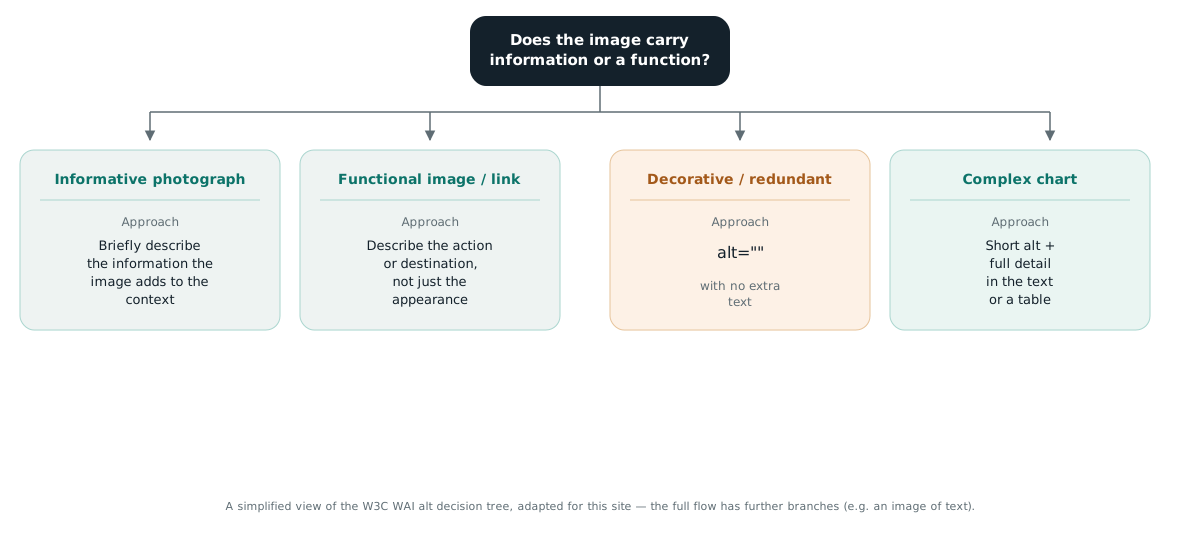
Alt text: describe the meaning or the function of the image.
Alt text primarily provides a textual alternative when an image is unavailable. It also helps a search engine understand the subject — but that is no reason to turn every image into a list of brand, model, colour, material and keywords.
How is the alt value chosen?
Alt text primarily provides a textual alternative when the image is unavailable. It also helps a search engine understand the subject, but that is no reason to turn every image into a list of brand, model, colour, material and keywords.
| Type of image | Approach |
|---|---|
| Informative photograph | Briefly describe the information the image adds to the context. |
| Functional image or link | Describe the action or destination, not just the appearance. |
| Decorative or redundant | Use alt="". |
| Complex chart | A short alt plus the full information in text or a table. |
| Image of text | Convey the text if it is not already present as real text. |
A file name does not have to repeat the alt text. It should be short and descriptive where that is practical, but Google describes it as a very light signal. URL stability and page context usually matter more than mechanically renaming every image.
The same image, three different alt texts
There is no correct alt text for an image in itself. There is a correct alt text for an image on that page, in that section, in that role.
Take the same photograph of a black shoe on a light background and place it in three contexts.
| Where it sits | Alt text | Why |
|---|---|---|
| Product page | Nike Pegasus 41 men's running shoe, black | The reader is choosing a product; the exact model and colour are the information they want |
| Article about a visual search test | A black running shoe isolated against a light studio background | The subject is the framing and the background, not the model; a model name would be noise |
| Decorative image in a blog header | alt="" | It adds no information; a screen reader should skip it |
One image, three correct answers. This is why the rule “always state brand, model and colour” does not exist — in the second row it would be wrong.
How long should alt text be?
As long as it needs to be to convey the information or the function, and no longer. For most images that is one short sentence.
Overlong alt text is an accessibility problem before it is an SEO problem. A screen reader speaks it in full, with no way to skip halfway. Listing ten attributes turns one image into a long pause in the reading.
| Example | Assessment |
|---|---|
shoe | Too short — adds nothing the context does not already give |
A black running shoe on a light background | Good for most contexts |
shoe running black mens sports footwear cheap buy online | Keyword stuffing; harms accessibility and does not help |
What alt text cannot do
- It cannot make up for what the image does not show. If the material is not visible in the photograph, writing the material into alt does not make the image more informative — that belongs in the page text.
- It does not replace a caption. Alt is an alternative for those who cannot see the image; a
figcaptionis read by everyone. Information that matters to all readers goes in the caption. - It does not rank an image on its own. Page context, surrounding text and the section heading carry more weight than the alt attribute.
- It does not help when key content is an image of text. A price list published as an image stays inaccessible however good the alt is.
SVG, icons and graphics that are not <img>
Inline SVG has no alt attribute. Its alternative text is supplied through role="img" and a <title>, or through aria-label.
This is the most frequently missed case, because an SVG is dropped straight into the HTML and looks like an image, while to a screen reader it is a group of geometric shapes.
<svg viewBox="0 0 100 100" role="img" aria-labelledby="icon-title">
  <title id="icon-title">Download the price list as a PDF</title>
  <path d="…"/>
</svg>
For more complex diagrams, add a <desc> with a longer description and reference both identifiers from aria-labelledby. The diagrams on this site are built that way.
| Case | Solution |
|---|---|
| Inline SVG that carries meaning | role="img" plus <title>, and <desc> if needed |
| Inline SVG used as decoration | aria-hidden="true" and focusable="false" |
SVG loaded via <img src="/…svg"> | An ordinary alt attribute, as for any image |
| Icon font | aria-hidden="true" on the icon, the text in an adjacent element |
| Image as a CSS background | No alternative exists; if it carries meaning, it must not be a background |
<canvas> | Text content inside the element as a fallback |
alt, aria-label and title — when to use which
alt is for <img>. aria-label is for elements with no visible text, such as an icon-only button. title is not a substitute for either.
The title attribute appears as a tooltip on hover, does not exist on touch screens and is handled inconsistently by screen readers. Never make it the only carrier of information.
| Element | Correct |
|---|---|
| Image in the content | <img src="/…" alt="Description"> |
| Icon button with no text | <button aria-label="Close"> |
| Link containing an image and text | The image gets alt="", because the link text already describes the destination |
| Link containing only an image | The alt describes the destination, not the appearance of the image |
The last two rows are a common source of duplication. When a header logo sits inside a link to the home page with no text beside it, its alt should read as the site name — that is the destination. If the word “Home” already sits next to it, the logo takes an empty alt.
Complex charts and long descriptions
A chart that conveys data cannot fit into one sentence. A short alt names what the chart shows; the full information belongs in text or a table that everyone can read.
The poor solution is cramming every number into alt. A screen reader then recites a string of figures with no structure and no way to go back or compare.
The good solution has three layers: an alt that names the chart, a figcaption that states the conclusion, and a table or paragraph with the data. The AI impression chart in our control case study is built this way — the same figures appear in a table below it.
| Layer | Content |
|---|---|
alt | What the chart shows and its extreme values |
figcaption | The conclusion the reader should draw |
| Table or text | All the data, available to everyone and searchable |
Alt text in catalogues generated from a database
When thousands of images are generated from a database, alt text is not written by hand but through a template. The template needs a fallback value and a length limit, or it produces empty or endless descriptions.
alt = [brand, model, product_type, colour]
      .filter(notEmpty)
      .join(", ")
      || product_name
Three rules that template respects. First, the order runs from most specific to most general, because the description is read from the start. Second, empty fields are dropped rather than leaving double commas. Third, a fallback exists for when every field is empty.
| Problem | Consequence | Fix |
|---|---|---|
| The same alt on every image of a product | Five photographs of one item are indistinguishable | Add the angle or detail: “side view”, “sole”, “worn” |
| Alt contains the SKU | A screen reader recites a string of digits | The SKU belongs in the page text, not in alt |
| Empty alt when a database field is missing | The image becomes inaccessible | A fallback value in the template |
| Alt longer than two hundred characters | A long pause in the reading | Limit the number of fields in the template |
Finding the problem across a whole site
Manual review works on ten pages, not on a thousand. On a larger site the problem is found by searching the source.
# images with no alt attribute
grep -rn '<img' --include="*.html" . | grep -v 'alt='

# inline SVG with no role or aria-hidden
grep -rn '<svg' --include="*.html" . | grep -v 'role=\|aria-hidden'

# alt containing a file name
grep -rno 'alt="[^"]*\.\(jpg\|png\|webp\)"' --include="*.html" .
The third command finds the clearest trace of automated processing — an alt value that is actually the file name. It means the alt was never written, only populated.
When there are hundreds of such images, listing them by URL and setting the order of fixes is part of a site audit.
Frequently asked questions
Does every image need alt text?
Every image needs an alt attribute, but decorative images should have an empty one. Omitting the attribute and leaving it empty are not the same thing — an empty alt tells a screen reader to skip the image.
Should alt text contain keywords?
Not as a goal. If a term is a natural part of an accurate description it will appear on its own. Stuffing keywords harms accessibility and brings no benefit.
What is the difference between alt text and a caption?
Alt is an alternative for those who cannot see the image. A caption is read by everyone. Information that matters to all readers belongs in the caption, not in alt.
Does the file name have to repeat the alt text?
No. A descriptive name is useful where practical, but Google describes it as a very light signal. The stability of the image URL matters more than renaming.